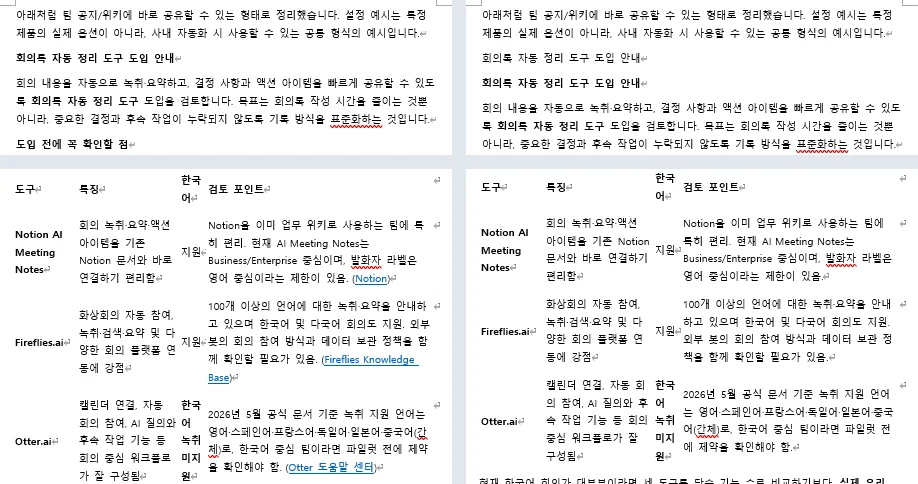
Paste ChatGPT into Word with a plain Ctrl+V and most of the answer arrives as Word features. In four pastes on one PC, the bulleted lists came in as Word lists, the numbered steps kept their numbers, the tables came in as real Word tables, the links stayed clickable and the bold phrases stayed bold. No Markdown symbols were visible in any of the four documents.
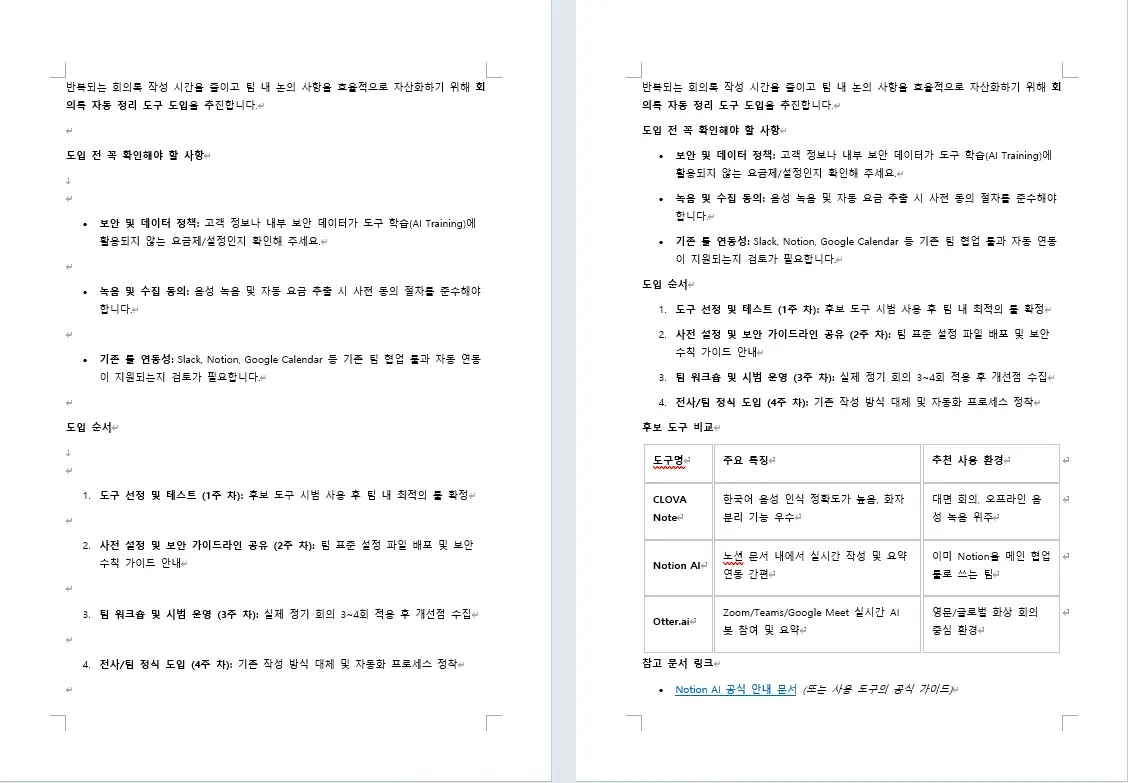
One thing did not arrive: heading styles. The lines that read as headings came in as bold body text, so Word does not treat them as headings at all. That is the main thing to fix by hand, and three smaller ones follow it.
The four pastes were made in Chrome on September 19, 2026, into new Word 2021 documents on Windows 11: one answer each from ChatGPT and Gemini, copied two ways. The answers and this PC’s Word are in Korean, and this PC’s paste setting is not the one Microsoft documents as the default. Both are spelled out at the end.
What survives a plain Ctrl+V
Here is what the four documents held, element by element. Each case was pasted once, so this is what this test saw rather than a rule.
- Bulleted lists: Word bullets, with the line breaks inside a single item kept.
- Numbered steps: Word numbering, with the numbers in order.
- Tables: real Word tables. The ChatGPT table arrived with no borders, the Gemini one with borders, 4 rows by 3 columns.
- Links: live hyperlinks, still clickable — except in the dragged ChatGPT paste, where the three source links inside the table cells were missing and the one link in the running text came through.
- Bold: still bold.
- Headings: bold body text. Only one of the four documents was read out of Word rather than read on screen, and in that one no heading style had been applied anywhere.
- Code and configuration samples: ordinary paragraphs in the body font, with the two-space indents intact.
- Block quotes: no quote formatting at all. In one document the quoted line arrived as bold text instead.
Not one of the four pastes put a Markdown symbol on the page. Hash marks do appear inside one of the documents, but those are comments in a YAML sample, which is content rather than something left over from the copy. The longest of the four answers came to 536 words over three pages.
One copy carries two versions of the answer
A single copy from a chat carries the answer twice, once as formatting and once as plain text. The plain-text version is the Markdown, hash marks and asterisk pairs and pipe table included. Which of the two lands in your document is decided by how you paste, not by the chat.
Word’s four choices are Keep Source Formatting, Merge Formatting, Picture (Microsoft 365 only) and Keep Text Only. Microsoft lists them on its Control the formatting when you paste text page, along with the settings behind them in File > Options > Advanced > Cut, copy, and paste. Paste ChatGPT into Word with one of the first three and the formatted version is in play. Choose Keep Text Only and the plain-text version is what lands.
In an earlier automated run with a different ChatGPT answer, the captured clipboard pasted as text only showed hash marks on six heading lines, 32 double asterisks around the bold phrases, and the table as five lines of pipe characters. That document had no Word table and no live link left in it at all. The run was pasted by a script rather than by hand.
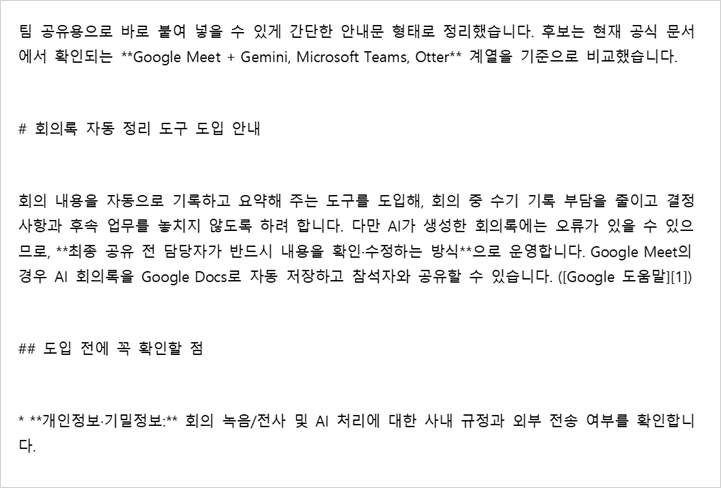
That plain-text version is the one you want when the destination only takes text, like a messenger box, a plain note or a form field. The Markdown Remover strips those symbols in the browser before you paste. It strips the formatting with them, so when the point of the paste is to get the lists, the table and the links into a Word document, there is no reason to send the answer through it.
Headings arrive as bold text, not heading styles
On screen the heading lines look like headings: they sit on their own line and they are bold. Word does not see them that way.
One of the four documents was read out of Word directly, through Word’s own automation, while the file was still open. All 42 of its paragraphs carried the Normal style. There was no Heading 1, Heading 2 or Heading 3 anywhere in it, although five of its lines were sitting there acting as headings. The rest of the structure was real: 8 list paragraphs, a bordered 4-by-3 table and one live hyperlink.
Microsoft’s Use the Navigation pane in Word page states the condition. If you have applied heading styles to the headings in the body of your document, those headings appear in the Navigation pane, which opens with Ctrl+F or from the View tab. In this document no heading style had been applied to anything, so those bold lines are not headings as far as Word is concerned. When you paste ChatGPT into Word, heading styles are the one piece of structure you put back yourself.
Four things to fix after you paste ChatGPT into Word
The first one is the one that matters in every document. The other three depend on how you copied and what the document is for.
- Apply Heading 1 and Heading 2 to the lines that are acting as headings. Click in the line and pick the style from the Styles gallery on the Home tab. Those lines then show up in the Navigation pane, which is also the fastest way to see whether you got them all.
- Put the code and configuration samples into a monospaced font. They arrive as plain body-font paragraphs. The indentation itself survived in this test, two leading spaces and all, so what is missing is the font rather than the structure.
- If you copied by dragging the selection, check the top of the document and the inside of the table. In this test the dragged ChatGPT answer repeated its first heading line, and the three source links that sat inside the table cells were not there.
- If the document is going to be printed, look at the table borders. The ChatGPT table came in without any, which is easy to miss on screen and obvious on paper.
If what you are pasting is an Excel table rather than a chat answer, the thing that usually breaks is width instead of styles. When an Excel table pasted into Word runs off the page covers that case.
For ChatGPT the two copy methods were nearly the same. The copy button gave three pages and 536 words, the dragged selection three pages and 535. The two differences are the ones in the list above: the repeated heading line and the source links missing from inside the table.
For Gemini the two methods differed in spacing. The copy button version carried a blank line after each heading line and after every list item, and ran to three pages. The dragged version of the same 255-word answer had none of those blank lines and fit on two. An earlier automated run with a different Gemini answer also produced blank paragraphs after list items, so that is two sightings, both on this PC on this day.
These are four results, one paste each. They are not a ranking of the two copy methods or of the two chats.
How this was tested, and what wasn’t
The pastes were made on September 19, 2026, in Chrome on Windows 11, into new blank documents in Word 2021 (16.0, build 20326). One answer each from ChatGPT and Gemini, each copied twice, once with the chat’s own copy button and once by dragging the selection. The model and the plan behind each answer were not recorded.
The answers were written in Korean, and the Office interface on this PC is Korean, so the option names above are the English names from Microsoft’s documentation. Microsoft’s paste page also says that by default Word preserves the original formatting when you paste with Ctrl+V, the Paste button, or right-click and Paste. This PC is not set that way. Its Pasting from other programs option was set to Merge Formatting. Check yours in File > Options > Advanced > Cut, copy, and paste before you expect the same result.
Two of the observations above did not come from a hand-pressed Ctrl+V. The 42 paragraphs and the Normal style were read out of the open document through Word’s automation, which only read and changed nothing. The text-only paste came from a separate automated run in which the clipboard captured from the copy button was pasted by a script.
Not tested:
- A hand-pressed Ctrl+V in a Word left at the default paste setting
- Answers in English, or Word with an English interface
- Claude, or any chat other than ChatGPT and Gemini
- Word for Mac, Word for the web, and Google Docs
- ChatGPT’s canvas export to a .docx file
- Asking the same question again to see whether a second answer behaves the same way
- Pasting into Word through the Markdown Remover
- Justified text, and the word breaks that come with it
Applying the heading styles right after the paste is worth the minute it takes. The Navigation pane becomes a map of the document from that point on, and the headings are ordinary Word headings rather than bold lines you have to recognize by eye.
All of this is four pastes, on one PC, on one day. It is a record of what happened, not a promise about what you will get when you paste ChatGPT into Word on yours, so read the date along with the result.