When you paste a ChatGPT answer into Word or Google Docs, what changes is the way it looks. Paste the same kind of content into Excel and the cells can end up holding something different from what the chat showed. A formatting change is one you can see. A value change is one that looks right and is not.
That split decides what to do first, and in two of the three apps the moment that matters comes before the paste. If you paste a ChatGPT answer into Excel, set the columns to Text first. If a block of several lines belongs in one cell, open the cell with F2 before pasting. If what you need is really a spreadsheet, ask the chat for an .xlsx file and skip the paste. In Word the work comes afterwards instead, in the Styles gallery.
The numbers below are not one comparison run. They come from seven tests made between September 19 and October 5, 2026, each on its own day with its own input, on one Windows PC with Word and Excel 16.0, build 20326. The Google Docs test ran on one personal Google account, and the three file requests used paid or work chat accounts. No single answer was sent into all three apps. Each number links to the test that measured it.
Two kinds of change, and only one of them is visible
In Word and in Google Docs the content arrived and the presentation did not. Reading the document tells you what happened, because the difference is on the page. In Excel the sheet looks finished either way, and the change sits inside the cells: a value replaced by another value, or a row count that no longer matches the table that was copied.
| Where it was pasted | What came out different | Kind of change |
|---|---|---|
| Word, plain Ctrl+ | Heading lines arrived as bold body text | Display |
| Google Docs, Ctrl+ | Markdown characters stayed as characters | Display |
| Excel, a table into General columns | 007 read as 7, 3-4 read as a date, the 16th digit gone | Content |
| Excel, several lines into a selected cell | Three lines became three rows, one answer 64 rows | Content |
| Excel, a Word table | 4 rows became 6, with 6 merged cells | Content |
The first two rows announce themselves. The last three are the ones to check on purpose, because a sheet with changed values in it still looks like a finished sheet.
In Excel, paste a ChatGPT answer and the values change
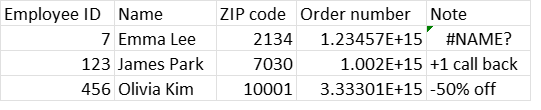
Pasted into columns left at General, the test table came in with its labels read as numbers. Employee ID 007 came in as 7, ZIP code 02134 as 2134, a size written 3-4 as the date March 4, and a 16-digit order number as 1.23457E+15. Microsoft’s Keeping leading zeros and large numbers page gives the limit behind that last one: Excel holds 15 significant digits, so the 16th was already gone.
Setting those columns to Text before the paste kept every value as written, and changing the format afterwards brought nothing back. When a ChatGPT table pasted into Excel changes your numbers has the cells before and after.
There is a route that skips the paste. Asked for the same table as a file, ChatGPT, Claude and Gemini each returned an .xlsx on the first request in that test, and all 24 cells in the three downloaded files held what was expected. One thing to know before trusting the screen: the preview pane that opens before the download showed the employee ID as 7, the same conversion a paste makes. What to check when you ask ChatGPT for an Excel file lists the five cells worth opening first.
Where the lines and the rows landed in Excel
Values are one half of it. The other half is where the content lands, and there the results split by what was on the clipboard.
Paste a ChatGPT answer, or any other block of text, into a selected cell and it goes down the column, one line to a row. Three lines landed in A1, A2 and A3, and one real ChatGPT answer took 64 rows, 25 of them empty. Pressing F2 to open the cell first put the same three lines inside one cell: four ways to paste multiple lines into one Excel cell has what each route did.
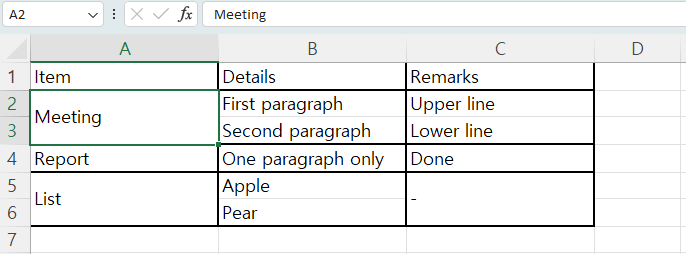
A table copied out of a Word document behaves differently again. A 3-by-4 table pasted with Ctrl+V came in as 6 rows. Each cell holding two lines split into two rows, and the one-line cells in those rows came in merged to cover the split. The merged ranges were A2:A3, A5:A6 and C5:C6: three ranges, six cells in all. Replacing the line breaks inside Word before copying kept it at 4 rows with nothing merged, as pasting a Word table into Excel splits rows and merges cells sets out.
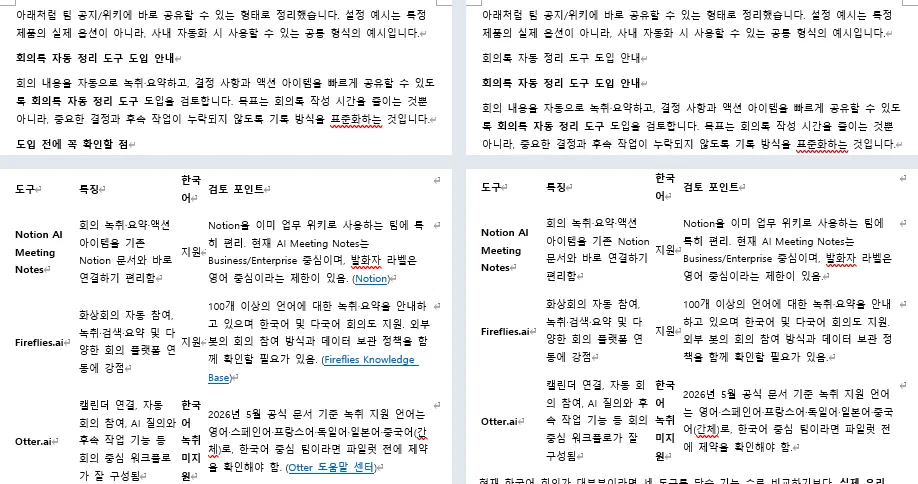
The opposite direction is its own problem. An Excel table pasted into Word keeps the column widths it had in the sheet, which is how an Excel table pasted into Word runs off the page.
Word kept the lists and the table, not the heading styles
Paste a ChatGPT answer into a Word document and most of the structure arrives as Word features. In four pastes the bulleted lists came in as Word lists, the numbered steps kept their numbers in order, the tables came in as real tables, the links stayed clickable and the bold phrases stayed bold. Not one of the four pastes put a Markdown symbol on the page.
The exception was the headings. The lines that read as headings came in as bold body text, and in the one document that was read out of Word rather than read on screen, all 42 paragraphs carried the Normal style. So the job after a paste into Word is to apply Heading 1 and Heading 2 to those lines by hand. What you actually get when you paste ChatGPT into Word covers the three smaller fixes behind that one. These were four pastes of two answers, one from ChatGPT and one from Gemini, each copied two ways, so a different answer can arrive differently.
Google Docs kept the characters as characters
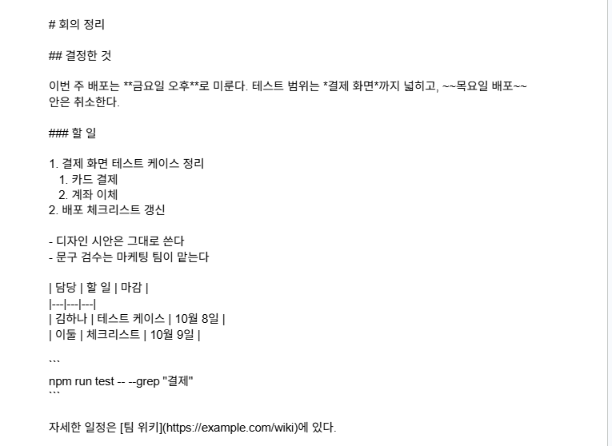
Paste a ChatGPT answer into Google Docs with the Markdown setting off and the symbols stay on the page as text. The test pasted a set of Markdown meeting notes copied as plain text rather than a chat answer: a plain Ctrl+V produced three lines beginning with hash marks, one asterisk pair, one tilde pair, four rows of pipe characters, two backtick fence lines and one bracketed link address, none of them turned into formatting. Automatic list detection was switched on at the time, and the numbered and bulleted lines still did not become lists.
The setting is the thing to change before the paste. Google’s 2024 announcement Import and export Markdown in Google Docs says the Markdown options are off by default and are switched on under Tools, then Preferences, then Enable Markdown. With the box checked and Paste from Markdown chosen from the right-click menu, the same text left nothing behind as a character, though the code block arrived as an ordinary paragraph rather than code. The Google Docs test of that option has the result element by element.
What these numbers are, and what they are not
The dates run September 19 for the Word pastes, September 28 for the lines into one cell, September 29 for the Word table, October 2 for the Excel table into Word, October 3 for the file requests, October 4 for Google Docs and October 5 for the ChatGPT table into Excel.
Those are seven separate tests rather than one comparison. The same answer was never sent into all three apps in one sitting, so the rows in the table above are the same kind of paste, not the same paste.
The environment is narrow as well. All of it ran on one Windows PC with a Korean Office installation, Word and Excel 16.0 build 20326. The Google Docs test used one personal Google account rather than a Workspace account, and the three file requests used ChatGPT Pro, Claude Max and a Gemini Google Workspace work account.
Excel for Mac, the web versions of either app, Google Sheets and an English Office installation were not tested. The plans behind the answers in the other tests were not recorded, and each test used one table or one answer, so a different input can land differently.
Why an AI answer carries those characters in the first place is a separate question, and this page does not answer it: why the characters are worth clearing out of an AI answer does. The Markdown Remover on this site strips those symbols out of copied text in the browser. It does not stop Excel’s conversions, gather lines back into one cell, or apply heading styles in Word.
Where you paste a ChatGPT answer decides when you can act. The conversion happens at the moment of the paste, so in Excel the column format, the open cell or the file request has to come first, and in Google Docs the one checkbox. Word is the one of the three where the work waits until afterwards, in the Styles gallery.
Once an Excel column has converted a value, changing the format afterwards does not restore it, so the shorter route is to paste the same copied table again into columns already set to Text. All of it is one PC, two months of 2026, and one test for each result above.