When you ask ChatGPT for an Excel file, the download is only half the job. In this test the answer came back with a file card, and the preview pane that opened before the download showed the employee ID as 7 instead of 007, the phone number without its leading zero, and a 16-digit order number as 1.23457E+15. The file looked broken before it had been saved.
The thing to judge is the downloaded file, not the pane. On October 3, 2026 the same table went to ChatGPT, Claude and Gemini once each, and all three returned an .xlsx on the first request. Opened in Excel, all 24 cells in all three files held what was expected: 007 stayed text, the order numbers kept all 16 digits, the hire dates arrived as date values. That was one table, one request each, three paid or work accounts, and a table written in Korean. The values that did change came from the paths that were not a file.
When you ask ChatGPT for an Excel file, check these five cells
Open the download and read these cells before anything else. They are the cells where the tool had to make a format decision, and they are what this test measured.
- Cells with a leading zero: employee IDs such as 007 and 0123, and a phone number written as 01098765432.
- Cells that can be read as a month and a day, such as 1-2 or 3-4. They should still be those characters.
- Reference numbers of 16 digits. Excel holds numbers to 15 digits, so check the last one.
- Cells that start with an equals sign. They should be words, not a formula and not an error.
- Cells that hold two lines. The break belongs inside the one cell.
Then look the other way. Hire dates, salary amounts and percentage rates should be values rather than text, because those are the cells that get sorted and added up.
A file carries the format along with the value, so each cell arrives labeled as text, a date or a number. A table moved off the screen carries only what the screen showed, and the receiving program guesses again. A pane that looks wrong is not a reason to delete the file and ask again.
All 24 cells in the three downloaded files were as expected
The one thing to read from this table: all three files held 007 as text and kept every digit of the order numbers.
| Tool | Account tested | 24 cells |
|---|---|---|
| ChatGPT | Pro | All 24 as expected |
| Claude | Max | All 24 as expected |
| Gemini | Google Workspace work account | All 24 as expected |
That is one request per service, sent once on October 3, 2026, against one table of three rows and eight columns. The free plans were not tested.
ChatGPT’s answer said it had handled the ID, phone, order number and note columns so they would not be auto-converted, and had given the hire date, salary and performance rate columns an Excel format. Claude’s answer listed the columns it had kept as text and noted that 8% would display as 8.0%. Gemini’s answer added an average row at the bottom that the request had not asked for; the 24 cells were unaffected by it, and that is what Gemini did in this run.
The preview pane showed different values than the file
The pane that opens when you ask ChatGPT for an Excel file and click the file card, before the download, is not the file. In this test it showed the employee IDs as 7 and 123, the phone number as 1098765432 and the order number as 1.23457E+15. The downloaded file held 007, 0123, 01098765432 and all 16 digits, every one of them as text.
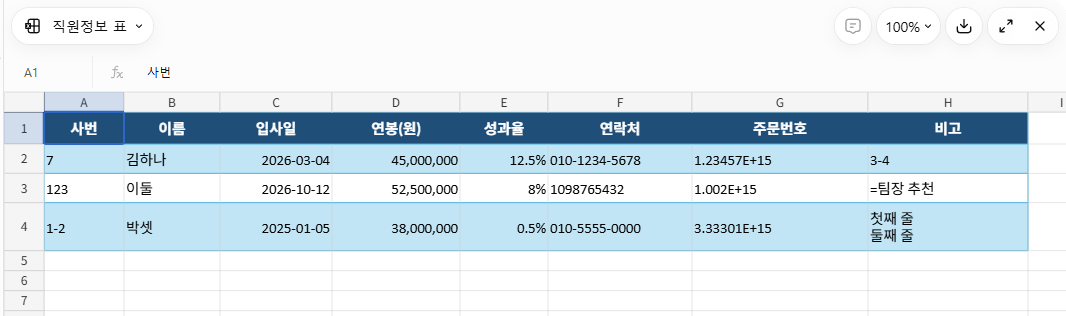

Why the pane displayed those values was not tested. It is a viewer, so download the file and read the cells in Excel.
Sending the same table to Google Sheets changed six or seven cells
The two paths below started from a different request. Instead of a file, it asked for the table to be shown as a table on screen, and that table was then moved into Google Sheets. Each path ran once, on October 4, 2026.
Exporting Gemini’s table with Export to Sheets changed 7 of the 24 cells. The leading zeros went first: 007 became 7, 0123 became 123, and the phone number lost its leading zero. Then 1-2 and 3-4 became date values, the note starting with an equals sign turned into an error, and the two lines in one cell were joined into one. That error reads #ERROR! on the Sheets screen; download the same sheet as .xlsx, open it in Excel, and the cell reads #NAME? instead.

Copying the ChatGPT answer with the button under it and pasting into a new Google Sheet changed 6 of the 24 cells, the same ones. Two things survived that path: the two lines stayed inside one cell, and the columns split correctly instead of landing in a single column.

When you ask ChatGPT for an Excel file, the format travels with the value; both paths above started from a table on the screen instead.
If you are copying an answer’s text instead, the Markdown Remover has a Copy table for Excel button that turns Markdown table rows into tab-separated cells. It does not stop a spreadsheet’s conversions, so the five cells above still need a look.
How this was tested, and what was not
The three requests went out between 10:04 and 10:06 p.m. Korea time on October 3, 2026, in Chrome on one Windows PC. The accounts were ChatGPT Pro, Claude Max and a Gemini Google Workspace work account. ChatGPT showed no model name and the reasoning setting in its composer read High, left at the default; Claude ran Opus 5.5; Gemini’s model selector was on its thinking model, also left at the default. Claude’s code execution and file creation setting was already on and was not changed. Each service got a new conversation with the same request pasted once, and no follow-up.
The three files were 5,213, 5,600 and 5,800 bytes, each with a Korean file name. They were read with Excel 16.0 build 20326 on a Korean (ko-KR) installation, and each of the 24 cells was compared against its stored value, its displayed value and its number format.
The evidence is Korean. The request, the header row, the names and the notes in the test table are Korean, the Excel install is Korean, and all four pictures show Korean text. The cells being checked do not depend on the language, but the test was not repeated with an English table or an English installation of Excel.
Two official pages sit next to this test without being part of it. Anthropic’s Create and edit files with Claude page says code execution and file creation is available to all Claude users, Free through Enterprise, and lists .xlsx among the formats Claude can create; the page is marked Last Updated August 6, 2026, and it was checked again on October 9, 2026. Google’s file generation announcement for the Gemini app, dated April 29, 2026, lists XLSX among the formats and says the feature is available to all Gemini app users globally.
Those are statements of availability, not results. For ChatGPT, no official page on downloads by plan was checked, so the only claim made about it here is that the account used was Pro.
Not tested:
- What a free account returns when you ask ChatGPT for an Excel file
- Failed downloads and broken file links
- The same request sent again, or a different table
- An English table, or an English installation of Excel
- Excel for Mac, Excel for the web, Numbers, and opening the files in Google Sheets
- Pasting an answer’s text straight into Excel
- Why the preview pane displayed different values
One run is not a general advantage. The request used here said nothing about formatting; it asked for the table as an .xlsx that could be downloaded. Each of the three answers still said which columns it had protected from auto-conversion and which ones it had given an Excel format. The next time you ask ChatGPT for an Excel file, that list is the short version of which cells the tool decided something about. These results are one table, one request, three paid or work accounts, October 3, 2026.